
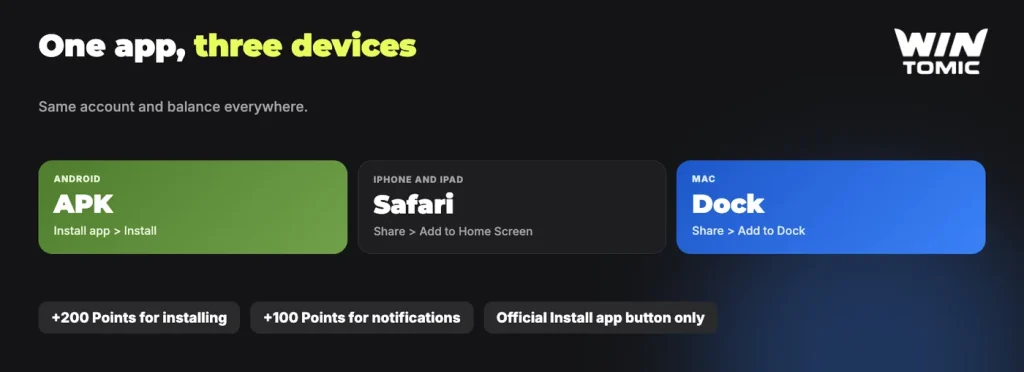
The Wintomic app puts our casino, live tables, sportsbook, tournaments and cashier behind one icon on your phone or desktop. For Android, the Wintomic download is an APK from the Install app button, iPhone and iPad users add us to the Home Screen through Safari, and there is an application for macOS as well. Installing also pays: 200 Points land in your account for the install, plus 100 Points for your first push notification subscription on Android.
Pick your device in the picker below and it will show you the install route that applies to you.
- Tap Install app in the menu, then download the APK file.
- Open the downloaded file.
- Allow installation from this source if your phone asks.
- Tap Install, then open Wintomic and sign in.
- Open Wintomic in Safari.
- Tap Share.
- Choose Add to Home Screen.
- Tap Add. The Wintomic icon appears on your home screen.
- Open Wintomic in Safari.
- Click Share.
- Choose Add to Dock.
- Click Add. Wintomic opens from your Dock.
Install from our official site only. 200 Points for installing the app.
What you get in the app
The app runs on the same account you already use. Your balance, your bonuses and your history travel with you, so there is nothing to transfer and nothing to set up twice. If you deposited on desktop in the morning, the same funds are there on your phone in the evening.
From the app you reach the casino lobby with games from Pragmatic Play, Evolution, BGaming, 3 Oaks Gaming and other studios, the Live Casino tables, Quick games, the Fortune wheel, our sportsbook and esports markets, and the Tournaments section. The profile menu carries the parts of the account you use most: Deposit, Withdraw, Bonuses, Bonus codes, Bet history, Transaction history and 24/7 support. In short, the app is the whole of our casino and sportsbook in one tap rather than a trimmed-down version of the lobby.
Notifications are the other reason to install. With push notifications switched on, you hear about a new promotion or bonus while it is still live, instead of finding it after the fact.
Wintomic APK install on Android
Our Android app is not distributed through Google Play, so it arrives as an APK file that you download from us directly. The phone will ask for your permission once during the process; that is normal Android behaviour for any file installed outside the store, and you can switch the permission back off afterwards.
- Open our platform in your mobile browser. Chrome, Samsung Internet or any modern browser works.
- Tap Install app. The button sits in the interface alongside the main menu and starts the Android download.
- Download the APK. Accept the browser prompt that asks whether to keep the file.
- Allow the install. When Android asks whether to permit an install from this source, confirm it.
- Open the downloaded file and install. Tap the file in your notification shade or in Downloads, then tap install and wait for it to finish.
- Sign in and switch on notifications. Log in with your usual details and accept the notification prompt to claim the extra 100 Points.
Keep in mind
Only the app you download from our official Install app button is ours. An APK offered anywhere else is not the Wintomic app, whatever it is called or however it is packaged.
Wintomic iOS: add us to your Home Screen
On iOS the route runs through Safari. Open our platform in Safari, use the Install app button, then add Wintomic to the Home Screen through the Safari Share menu. The icon then behaves like a normal app: it opens full screen in its own window, without the browser address bar taking up space above the lobby.
Two small points help here. Use Safari rather than another browser, because the Add to Home Screen step belongs to Safari. And keep iOS and Safari updated, since an old browser version is the usual reason a modern casino lobby renders oddly on an iPhone.
Mac: add Wintomic to your Dock
Desktop players on macOS get the same treatment. In Safari, open our platform, then choose Share, then Add to Dock, then Add. The application sits in your Dock from then on and opens in its own window, which is convenient if you follow live sport or a tournament leaderboard while doing something else on the Mac.
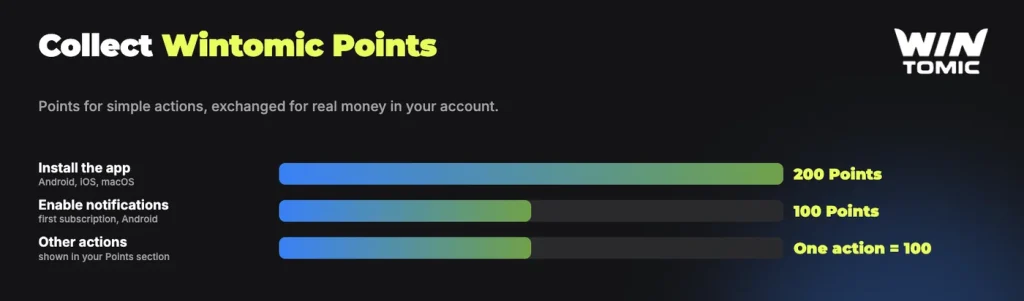
200 Points for installing, 100 for notifications
Installing the app is itself a rewarded action on our platform. The amounts are fixed and credited for the actions below.
| Action | Wintomic Points |
|---|---|
| Installing the app | 200 Points |
| First push notification subscription (Android) | 100 Points |
Points are collected for actions on the platform and exchanged for real money. The exchange rate and the minimum amount you can exchange are shown in the Points section of your account, so check there before you cash anything in. The notification reward is listed for Android on the promotion card, so iPhone users should treat the 200 Points for the install as their part of this offer. If you want the fuller picture of what else earns them, you can collect Points from several other actions besides the install.
Signing in and using your account in the app
The first screen after installation is the login screen. Use the phone number or e-mail and the password from your account, exactly as on desktop. If you have not registered yet, you can create the account inside the app: choose your currency, enter a Malaysian phone number, an e-mail and a password of at least 8 characters, and accept the Terms. Google and Telegram sign-up work in the app as well. Our guide to how to sign in covers forgotten passwords and the social sign-up routes in more detail.
One rule applies before your first deposit through the app. Deposits and withdrawals must use a payment method in your own name, and withdrawals go back, where possible, to the method you deposited with. The cashier in the app is the same cashier, so Touch ‘n Go, DuitNow, FPX and Boost appear there for ringgit accounts, with the exact minimum and maximum for each method shown in the deposit and withdrawal windows.
The install takes a couple of minutes, pays 200 Points and leaves you with the casino, sportsbook and cashier on your Home Screen.
If the app will not install
Most failed installs come down to one of three ordinary things, and all of them are quick to check.
- Storage space. An APK needs room to download and room again to unpack. Clear a few hundred megabytes and start the download again.
- Permission on Android. If nothing happens when you tap the downloaded file, the phone has not been allowed to install from that source. Confirm the prompt, or find the permission for your browser in the Android settings and enable it.
- An outdated browser on iOS or macOS. Update Safari and the operating system, then repeat the Share step. An interrupted download is the other suspect: delete the partial file and download it once more on a stable connection.
If it still does not work, our support team is available 24/7 through live chat in the Support section or by e-mail at [email protected]. Tell us the device and the step where it stops, and we will take it from there.
FAQ
Is the Wintomic app free to install?
Yes. The app is free. You install it from the Install app button on our platform, and you only ever pay for deposits you choose to make in the cashier.
Is there an app for iPhone?
Yes. Open our platform in Safari on your iPhone or iPad, use the Install app button or the Safari Share menu, and add Wintomic to your Home Screen. It then opens from its own icon like any other app.
How do I install the APK on Android?
Tap Install app on our platform in your mobile browser and download the APK file. When Android asks whether to allow an install from this source, confirm it, then open the downloaded file and tap install.
Do I get Points for installing the app?
Yes. Installing the app gives 200 Wintomic Points, and the first push notification subscription gives a further 100 Points on Android. Points are collected for actions on the platform and exchanged for real money.
Is there a Mac version?
Yes. Open our platform in Safari on macOS, choose Share, then Add to Dock, then Add. The app sits in your Dock and opens in its own window.
Wintomic operates under a Curaçao gaming licence. Players must be 18 or over, and you are responsible for following the laws that apply where you live.